Menus, brochures, event programs, CVs: sooner or later a document needs to jump from print to screen. To create a QR code for a PDF, you need two things: a public link for the file and a code that points to it. This guide gives you both in under a minute. The QR code itself costs nothing, and the hosting starts with a 15-day free trial.
Why put a QR code on a PDF
A QR code turns any printed surface into a door to your document. Diners scan a table sticker and get the menu. Recruiters scan a business card and get the full CV. Event guests scan a poster and get the program. No typing, no email attachment, no “can you resend that file?”
Here is the part most tutorials skip: a QR code is just a URL printed as pixels. The code itself is trivial to generate. The hard part is the URL, because a PDF sitting on your laptop has no URL at all, and a Google Drive share link is long, fragile, and can break the moment someone changes a permission setting.
So the real workflow is: host the PDF first, then generate the code. Get the hosting right and everything downstream (printing, updating, tracking) becomes easy.
Step 1: Get a stable link for your PDF
Your PDF needs a public URL that will not change. This is exactly what turning a PDF into a link is for: the file is served from a CDN at a clean address like menu.supadrop.site, with SSL included.
With Supadrop, the whole step is a drag and drop. Create a site, give it a name, pick a subdomain, and drop your PDF into the upload zone.
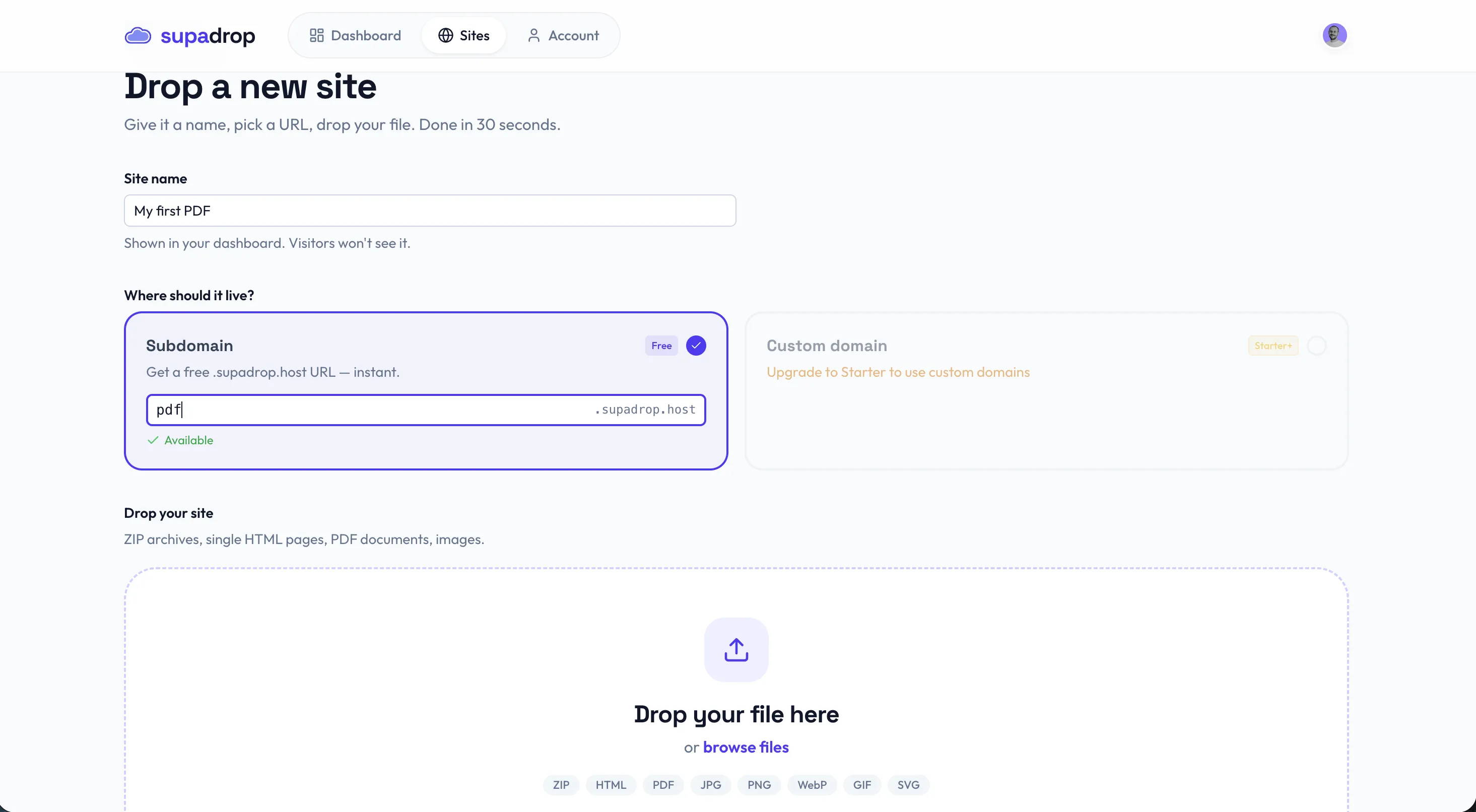
Thirty seconds later the file is live. The 15-day free trial requires no credit card; after the trial, plans start at $5 per month with the QR code included. If you want to compare other options first, we ranked the best free PDF hosting tools side by side, but the principle is the same everywhere: what you need out of this step is a short, stable, public URL.
Step 2: Download your PDF QR code
Here is where the hosting-first approach pays off. On Supadrop, you do not need a separate PDF QR code generator at all: every deployed site comes with an auto-generated QR code, displayed right next to the public URL in the dashboard.
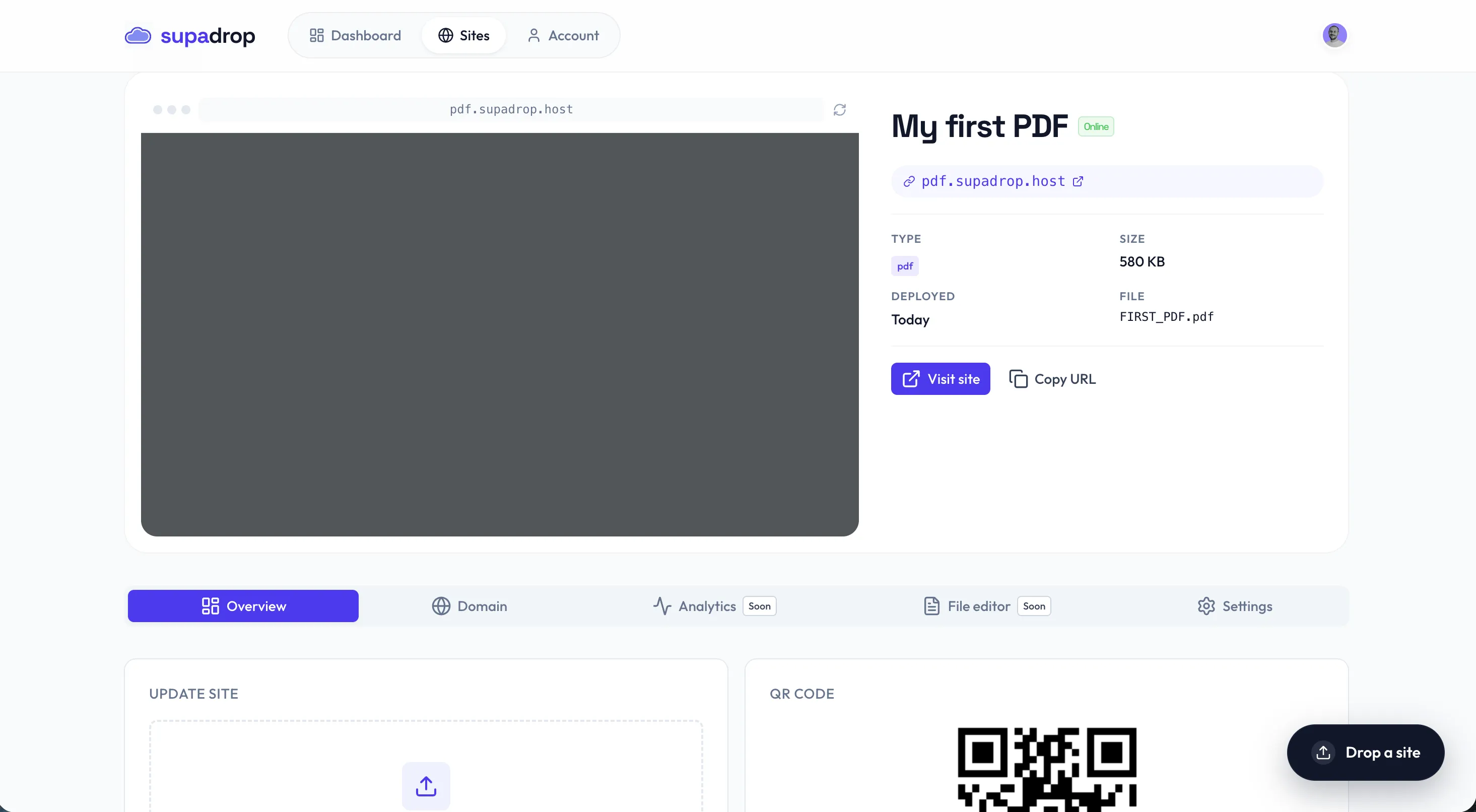
Download the code, drop it into your flyer, menu, poster, or business card design, and you are done. The code encodes your site URL, so anyone who scans it lands directly on the PDF.
Step 3: Print it and keep it working
A few rules keep scan rates near 100%:
- Size: print the code at least 2 x 2 cm (about 0.8 inches) for arm’s-length scanning, larger for posters scanned from a distance.
- Contrast: dark code on a light background. Inverted or low-contrast codes fail on many older phones.
- Quiet zone: leave a white margin around the code, at least four modules wide. Cropping it tight breaks scanning.
- Test before mass printing: scan the final artwork with both an iPhone and an Android phone, from the distance your audience will actually stand.
And the rule that saves you money later: never reprint if you can avoid it. Because your code points to a stable URL, updating the document is a file swap, not a print run. Replace the PDF on your Supadrop site and the URL stays identical, so the sticker you printed six months ago now opens the new version.
PDF QR code generators compared: dedicated tools vs hosting first
Search for a “pdf qr code generator” and you will find dozens of tools that bundle the two steps: they host your PDF and generate the code. Convenient on day one, but read the pricing page before you print anything.
Most dedicated generators (QR Tiger, Flowcode, Adobe, Canva and similar) treat a PDF QR code as a dynamic code, because they host the file and route the scan through their servers. Dynamic codes are the paid feature. Free tiers typically limit scans, deactivate codes after a trial period, or watermark the landing page. The failure mode is painful: the code on your printed menu stops resolving the day the trial ends.
The hosting-first approach flips the economics:
| Criteria | Dedicated PDF QR generator | Hosting first (Supadrop) |
|---|---|---|
| PDF hosting | On their servers, free tier limits | Your site, your URL, CDN-served |
| Code keeps working | Often expires on free plans | As long as your site is live |
| Update the PDF | Paid dynamic plans only | Included, URL never changes |
| Price | Free tier with expiry or scan limits, then subscription | 15-day free trial, then $5/mo, QR included |
| Landing experience | Their viewer, sometimes branded | Your document, full screen |
| Custom domain | Rarely, paid | Supported |
If you only need a code for a one-day event and do not care what happens after, a free dedicated generator is fine. For anything printed, client-facing, or long-lived, host the PDF at a URL you control and generate the code from that.
You are one scan away
That is the whole workflow: host the PDF, download the auto-generated QR code, print it with enough size and contrast, and update the file behind the same URL whenever the content changes. Drop your PDF on Supadrop and you will have a live link and a ready-to-print QR code before your coffee cools.
Frequently asked questions
Can I create a QR code for a PDF for free?
The code itself is free to create. Host your PDF on Supadrop and the QR code is auto-generated alongside the public URL, at no extra cost. Hosting starts with a 15-day free trial (no credit card), then $5 per month. Many dedicated PDF QR code generators advertise free plans, but PDF codes usually sit behind a paid dynamic QR tier or a scan limit.
Do QR codes for PDFs expire?
The code image itself never expires, it is just a picture of a URL. What expires is the link behind it. Free plans on dedicated QR services often deactivate PDF codes after a trial or a scan cap. If your PDF lives at a stable URL you control, the printed code works for as long as the file stays online.
Can I update the PDF without reprinting the QR code?
Yes, as long as the code points to a stable URL. On Supadrop, replacing the PDF on your site keeps the exact same URL, so every code you have already printed opens the new version instantly. This is the feature dynamic QR services charge a subscription for.
What is the difference between a static and a dynamic QR code?
A static code encodes a fixed destination that cannot change after printing. A dynamic code routes through a redirect service so the destination can be swapped later, usually for a fee. Hosting your PDF at a permanent URL gives you dynamic-style flexibility with a static code: same code, updatable content. Our QR code guide goes deeper on the trade-offs.
What is the best QR code generator for a PDF?
The best setup is a stable public link plus any generator. Supadrop covers both in one drag and drop: clean URL, SSL, and a downloadable QR code in under 30 seconds, with a 15-day free trial and plans at $5 per month after that. If you want fancy styling, feed that URL to any free QR design tool. See our comparison of free PDF hosting tools for the hosting half of the equation.
Can I use a PDF QR code for a restaurant menu?
Absolutely, it is one of the most popular use cases. Host the menu PDF, print the code on tables and flyers, and swap the file when prices change. For an even better mobile experience, our guide to creating a digital restaurant menu with a QR code shows how to serve an HTML menu instead of a raw PDF.