QR codes are no longer a pandemic-era workaround. They are a permanent bridge between physical materials and digital content, and adoption is still climbing. Statista projects 102.6 million US smartphone users will scan a QR code in 2026, up from 99.5 million in 2025. If your website or business does not have one yet, you are leaving offline traffic on the table. This guide covers two paths to creating a free QR code: using a hosting platform that generates one automatically when you publish, and using a standalone generator when you need a code for an existing URL. It also covers the print best practices, scan tracking strategies, and security precautions that most guides skip entirely.
What is a QR code (and why dynamic beats static)
A QR code is a two-dimensional barcode that stores data in a grid of black and white modules. Smartphone cameras decode the pattern instantly, making QR codes the fastest path from a physical surface to a digital destination. The critical distinction for any business is whether that code is static or dynamic, because the choice affects what you can do after printing.
How static codes lock in your data
A static QR code embeds the full destination URL directly into its pattern. Once generated, the data is permanent. There is no way to edit the link, swap the landing page, or fix a typo after the fact.
Static codes never expire because they require no server to resolve. The pattern itself contains everything a scanner needs. This makes them reliable for permanent information: a home Wi-Fi password, a fixed portfolio URL, or a vCard with your contact details. The trade-off is zero visibility. You cannot know how many people scanned the code, where they scanned it, or which device they used.
Why dynamic codes give you control after printing
Dynamic codes route through a redirect server. Instead of encoding your full URL, the pattern stores a short redirect link that you control from a dashboard. When someone scans the code, the redirect server forwards them to whatever destination you have set at that moment.
If your restaurant changes its menu, your promotion ends early, or you discover a typo in the landing page URL, you update the link in seconds without reprinting a single poster. Analytics are the real advantage. You can see scan counts, geographic locations, timestamps, and device types for every code you manage.
Bitly’s 2025 marketer survey found that 69% of marketers update or redirect their dynamic QR codes at least once per month, treating them as living marketing assets rather than static print elements. Understanding the difference between static and dynamic formats mirrors the broader choice between a static and dynamic website for your online presence.
How to create a free QR code for your website
There are two paths to a working QR code: use a hosting platform that generates one alongside your site, or paste your URL into a standalone generator. The first approach is faster if you are publishing new content. The second works when you already have a live URL and just need the code.
Publish your site and get a QR code automatically
Drop your HTML, PDF, or ZIP file into a static hosting platform like Supadrop. The system deploys your content to a global CDN and generates a unique URL plus a downloadable QR code in under 30 seconds. No separate tool to open, no code to copy-paste, no extra cost. A QR code always encodes a URL, so if your content is a document you need to create a link to a PDF before there is anything to encode.
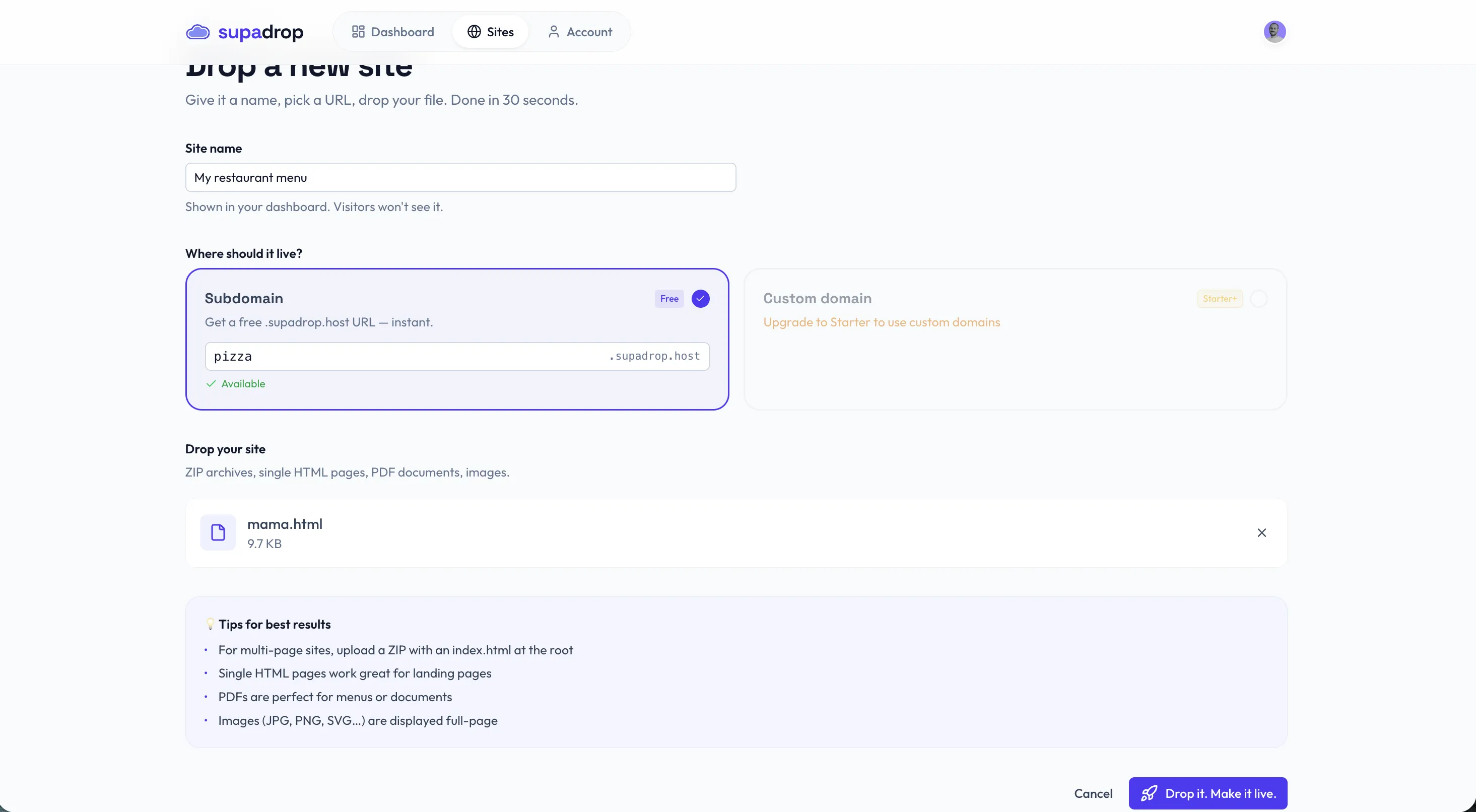
The code points to your live URL the moment your site goes online. Because the hosting platform controls the redirect, you can update the underlying files without changing the QR code itself. This is what makes it a dynamic setup: the printed code stays the same while the content behind it evolves. Download the code as PNG for digital use or SVG for print.
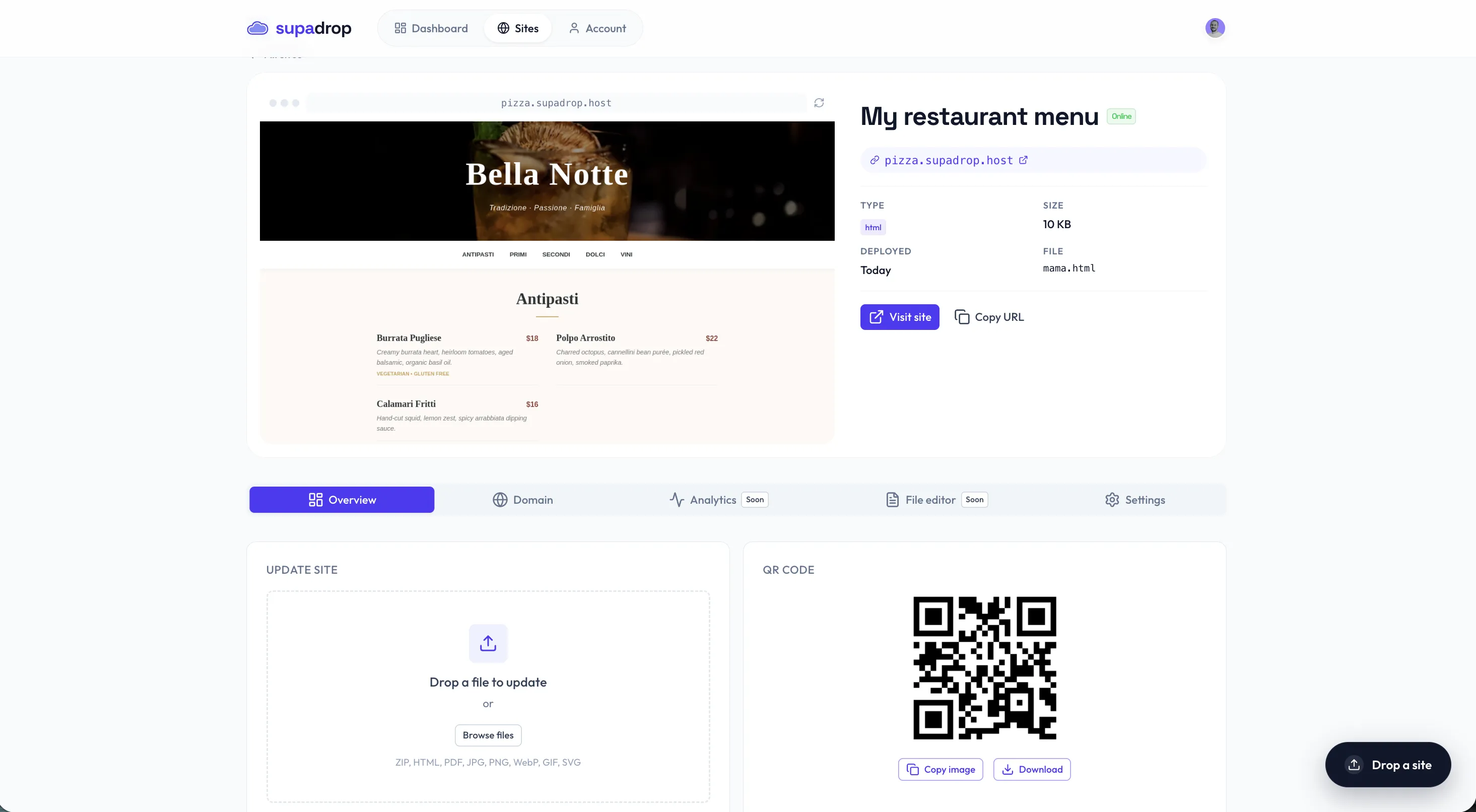
Static hosting platforms deliver your content from a CDN edge, so the page your QR code links to will load instantly on any phone. That speed is a direct consequence of how static websites work. Every deployed file also gets an auto-generated QR code that you can use on printed materials immediately. If your file is a document rather than a website, our guide on creating a QR code for a PDF walks through that exact workflow.
Use a standalone QR code generator
If you already have a live URL and just need the code, standalone generators work in three steps: paste your URL, customize the appearance (colors, logo, frame), and download. Most free tools produce a static code by default. Dynamic codes with analytics usually require a paid plan or a free-tier account.
For the best free experience without creating an account, paste your URL into a tool like QRCode Monkey. Choose your colors to match your brand, optionally add a logo to the center, and download as SVG for print or PNG for digital. The entire process takes under a minute.
Best free QR code generators compared
Not all free QR code generators offer the same features. Some require an account, some limit dynamic codes to paid tiers, and some inject their own branding into the output. Here is an honest comparison of five options that cover different use cases.
Hosting-integrated tools like Supadrop generate the code as a side effect of publishing your site. You get a QR code without thinking about it. Standalone free tools like QRCode Monkey are ideal when you already have a URL and just need the code fast. Freemium platforms like The QR Code Generator offer dynamic codes and analytics, but limit the free tier to a small number of codes.
Choose based on your workflow. If you are publishing a new site or landing page, the hosting-integrated path saves a step. If you need a code for an existing URL, a standalone generator is faster.
5 QR code use cases that drive real results
The National Restaurant Association’s 2024 Technology Landscape Report found that 52% of US restaurants have switched to QR code menus, a 150% increase over the past two years. But restaurants are just the beginning. Any business with a physical touchpoint can use a QR code to bridge print and digital.
Restaurant menus and table ordering
Print the code on table tents, stickers, or placemats so diners can browse a digital menu from their phone. When prices change or seasonal items rotate, update the hosted page without reprinting a single sheet. Bitly’s 2025 survey confirms that 48% of consumers scan QR codes specifically to access restaurant menus, making this the single most common use case. Our step-by-step tutorial on creating a digital restaurant menu with QR code covers the full workflow from upload to table tent, and our QR code menu generator for restaurants includes free templates to start from.
Business cards and portfolios
A QR code on a business card replaces a generic URL with a direct path to your portfolio or online resume. Scan-to-save is faster than typing a URL, and a dynamic code lets you update the destination when you redesign your site without reprinting your cards.
Event posters and flyers
A QR code on a conference poster can link attendees to a schedule, ticket page, or registration form. On a flyer, it turns a one-way print ad into a measurable marketing channel. Track which poster location generates the most scans by using unique UTM parameters for each placement.
Product packaging
Connect customers to setup guides, warranty registration, or recipe ideas by placing a QR code on the packaging. This extends the product experience beyond the physical item and gives you a direct communication channel with buyers.
Real estate signage
Let potential buyers scan a yard sign to view the full listing, photo gallery, and virtual tour. A dynamic code means you can swap the listing URL when the property sells and reuse the same sign for the next property.
Print and scan best practices
A QR code that looks perfect on screen can fail completely on a printed poster if you ignore the fundamentals of size, contrast, and file format. These guidelines ensure a reliable scan on the first try, every time.
Size, contrast, and quiet zone
Keep your code at least 2 cm wide for short-distance scanning (menus, business cards). As a rule of thumb, the scanning distance should be roughly 10 times the width of the code. A 3 cm code works at 30 cm; a 10 cm code works at 1 meter.
The ISO/IEC 18004 specification recommends a minimum contrast ratio of 4:1 between dark modules and the light background, with 7:1 or higher for reliable scanning in varied lighting. Always use a dark pattern on a light background. Inverting colors or using gradients within the modules can cause scanning failures in low-light environments. Stick to matte finishes on printed materials to avoid glare from glossy paper.
Maintain a quiet zone of at least 4 modules (the small squares that make up the code) of white space around the entire code. This margin helps smartphone cameras identify the pattern boundaries quickly.
Choosing the right file format
Use SVG for anything that will be printed. Vector files scale to any size without losing clarity, from a business card to a billboard. PNG works well for websites, email signatures, and social media posts where the display size is fixed.
Skip low-resolution JPGs. Compression artifacts create noise around the module edges that confuses scanning algorithms and frustrates users. If you need a raster format for print, export a high-resolution PNG at 300 DPI or higher.
Error correction levels explained
QR codes include built-in error correction that allows them to be read even when partially damaged or obscured. The ISO/IEC 18004 standard defines four levels:
| Level | Data recovery | Pattern density | When to use |
|---|---|---|---|
| L | 7% | Lowest | Clean digital environments, maximum data capacity |
| M | 15% | Medium | Most business applications, good balance |
| Q | 25% | Higher | Outdoor signage, environments with wear |
| H | 30% | Highest | Codes with a center logo, high-risk environments |
Higher error correction makes the code more resilient but increases pattern density. Dense patterns require higher-resolution cameras and better lighting to scan reliably. For most business use cases, Level M or Q strikes the right balance between durability and scannability. Use Level H only when you plan to place a logo over the center of the code, since the error correction compensates for the covered modules.
QR code security: protecting your business from quishing
“Quishing” (QR phishing) is a growing attack vector where fraudulent QR codes redirect scanners to fake login pages, malware downloads, or credential-harvesting sites. The FBI’s Internet Crime Complaint Center issued a public warning about tampered QR codes in 2022, and reports have increased every year since. As QR adoption grows, so does the attack surface.
How quishing attacks work
Attackers print stickers with malicious QR codes and place them over legitimate ones in restaurants, parking meters, transit stations, and public posters. Victims scan what they believe is a trusted code and land on a convincing phishing page. Because the redirect happens instantly and most people do not inspect the URL preview, the success rate is higher than traditional email phishing.
How to protect your customers
If you distribute QR codes for your business, take these steps to keep your audience safe:
- Use recognizable branding. Add your logo, brand colors, and a frame with your business name so users can visually confirm the source.
- Host on your own domain with HTTPS. A URL preview showing
yourbusiness.comis far more trustworthy than a shortened link from an unknown provider. - Educate your audience. Include a short line next to the code: “This QR code links to [yourdomain.com].” Modern smartphones display a URL preview before opening the link, giving users a chance to verify.
- Inspect physical placements regularly. Check that no one has placed a sticker over your printed codes, especially in public or high-traffic locations.
- Avoid URL shorteners from unknown providers. Use your own domain or a reputable shortener so the destination is transparent.
Track QR code scans without vendor lock-in
Most dynamic QR code platforms lock your analytics behind a proprietary dashboard. If you switch providers or your subscription lapses, you lose all historical data. There is a simpler approach that works with any analytics tool you already use: UTM parameters.
The UTM approach
Append tracking parameters to the URL before generating your QR code. A restaurant menu code might use:
https://yourdomain.com/menu?utm_source=qr&utm_medium=print&utm_campaign=table-tentEvery scan that reaches your site carries these parameters. Google Analytics 4, Plausible, Fathom, or any analytics platform that reads URL parameters will attribute the visit correctly. You can track which campaign, which physical placement, and which material drives the most traffic, all without a proprietary QR analytics subscription.
Per-placement tracking
Create a unique utm_campaign value for each physical location or material type. A poster in your storefront window gets utm_campaign=window-poster. A business card gets utm_campaign=business-card. A flyer at a trade show gets utm_campaign=tradeshow-june-2026. This granularity lets you compare the performance of each offline channel directly in your analytics dashboard.
This approach pairs well with a static website SEO strategy where you already have GA4 or a privacy-friendly alternative installed. The QR scan data flows into the same reports as your organic and paid traffic, giving you a unified view of all acquisition channels.
Embed a QR code on your website
Adding a QR code to your website lets visitors save or share your page from a phone with a single scan. It also creates a bridge for print audiences: someone who sees your QR code on a flyer can scan it and immediately land on the corresponding web page.
Adding the code as an image
The simplest approach is an <img> tag with your QR code file. Use the SVG version for crisp rendering on retina screens and high-DPI displays. Place it on your contact page, footer, or a dedicated “scan to visit” section.
Write descriptive alt text that includes your topic keywords naturally. Search engines index alt text, and accessible descriptions help screen readers convey the image content to visually impaired users. If you are new to HTML and static websites, embedding an image is a good first project.
Linking print materials back to your site
The reverse flow is equally valuable: putting a QR code on a physical flyer, menu, or business card that leads to your website. Pair QR codes with short, clean URLs to keep the code pattern sparse. A simple subdomain like menu.yourdomain.com produces a cleaner, easier-to-scan code than a long URL with query parameters.
For the best results, make sure your landing page is optimized for mobile. Follow a static website SEO guide to ensure fast load times and proper meta tags on the page your QR code points to. If you are looking for an affordable platform to host the landing page behind your code, explore these static hosting alternatives to find the right fit.
Frequently asked questions
Does Supadrop generate a QR code automatically?
Yes. Every time you publish a site on Supadrop, a QR code is generated automatically alongside your unique URL. You can download it as PNG or SVG and use it on menus, business cards, posters, flyers, or any printed material. The QR code is included with every plan, from the free 15-day trial through all paid tiers, at no extra cost.
Is it possible to create a QR code for free without it expiring?
Yes. Static QR codes do not expire because the data is encoded directly into the pattern with no server dependency. As long as the destination URL stays active, the code keeps working indefinitely. Auto-generated QR codes from hosting platforms also remain active for the life of your site. Dynamic codes depend on a redirect server, so their lifespan is tied to the provider’s uptime and your subscription status.
What is the difference between a static and a dynamic QR code?
A static QR code embeds the full destination URL directly into its pattern. Once generated, the content is permanent, with no editing and no scan tracking. A dynamic QR code stores a short redirect URL instead. You can change the destination anytime from a dashboard and access analytics like scan count, location, device type, and timestamp. Dynamic codes route through a redirect server, which is what enables tracking and editing after printing.
Which file format should I use when downloading my QR code?
Use PNG for digital placements like websites, email signatures, and social media posts. Use SVG for print. SVG is a vector format that scales to any size without losing sharpness, from a business card to a billboard. Avoid low-resolution JPGs because compression artifacts around the edges can cause scanning failures.
What is the minimum size for a QR code to scan reliably?
A QR code should be at least 2 x 2 cm (approximately 0.8 x 0.8 inches) for close-range scanning on menus and business cards. The general rule is that scanning distance equals roughly 10 times the width of the code. Always maintain a quiet zone of at least 4 modules of white space around the code so smartphone cameras can identify the pattern boundaries.
How does error correction protect damaged QR codes?
QR codes include built-in redundancy that allows them to be read even when partially dirty, scratched, or obscured. There are four levels: L recovers 7% of lost data, M recovers 15%, Q recovers 25%, and H recovers 30%. Use Level M or Q for most business applications. Use Level H if you plan to place a logo over the center of the code, since error correction compensates for the covered modules.
What is quishing and how do I protect my customers?
Quishing is phishing delivered through QR codes. Attackers place fraudulent codes over legitimate ones in public spaces, redirecting scanners to fake login pages or malware downloads. Protect your customers by using recognizable branding, hosting your landing page on your own domain with HTTPS, and educating users to check the URL preview that modern smartphones display before opening a link.
Which QR code type is best for small business marketing?
Dynamic QR codes are the stronger choice for marketing because they let you change the destination URL after printing and provide scan analytics. You can track which flyer, poster, or business card drives the most visits without paying for a separate analytics tool. For permanent information like a store Wi-Fi password or a fixed address, a static code works fine since it never expires and costs nothing to maintain.