Your QR code menu, live and scannable in 10 minutes.
A QR code menu maker and digital menu builder for restaurants, not for developers.
Turn your menu into a mobile-friendly web page with its own QR code. Write it with AI, host it on Supadrop, and change a price in seconds, without ever reprinting a menu again.
Be one of the first 100 restaurants: 50% off. Grab your code below.
- No app to install
- No code, no designer
- SSL & QR included
- Free 15-day trial
- 75% of U.S. restaurants use QR menus National Restaurant Association, 2025
- $3,800 average yearly print savings EasyMenus, 10,000-restaurant dataset
- 82% of diners prefer QR menus to paper Uniqode QR Code Study
What is a QR code menu?
A QR code menu is a digital restaurant menu that guests open by scanning a QR code with their phone camera, no app required. Instead of a printed card, your menu lives on a web page, and the QR code on the table points straight to it. Update the page once and every future scan shows the new menu.
-
Instant updates
Change a price or mark a dish sold out, and every diner who scans sees it right away.
-
No reprinting
The QR code never changes, so you never pay to reprint menus when something moves.
-
Multi-language ready
Add a translated version of your menu for tourists without printing a second set.
-
Contactless and fast
Guests open your menu in their phone browser in seconds, with no app to install.
New to this? Read our step-by-step guide to building a digital restaurant menu.
From paper to a live QR menu in four steps
No designer, no developer, no reprinting. Just your menu and ten minutes.
-
Write your menu with AI
Drop your current menu into ChatGPT with our ready-made prompt. It writes clean, appetizing descriptions in seconds.
-
Turn it into a web page
Ask ChatGPT to generate a mobile-first HTML page, or start from one of our 4 free templates below.
-
Host it on Supadrop
Upload the file and get a live URL in under 30 seconds. SSL and unlimited bandwidth included.
-
Print your QR code
Supadrop generates your QR code automatically. Place it on your tables and you are live.
Want the full walkthrough with copy-paste AI prompts? Read the step-by-step guide.
4 free restaurant menu templates
Real, responsive HTML menus. See each design below, then download the bundle and make it yours. No design skills needed.
-
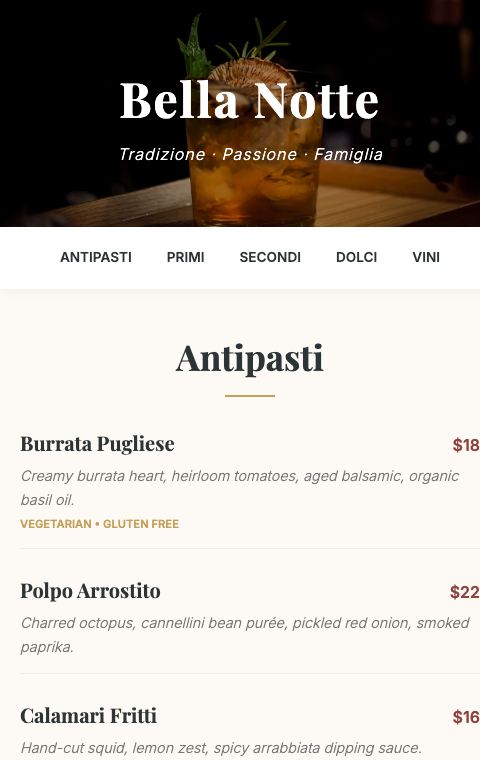
Elegant Italian
Warm cream tones and a Playfair Display serif for trattorias and fine Italian dining.
-
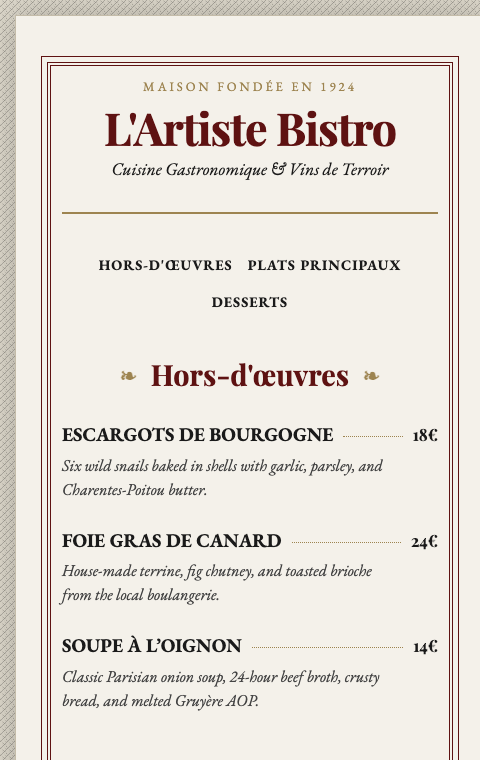
French Bistro
Vintage Parisian feel with dotted price leaders and a 1924 heritage touch.
-
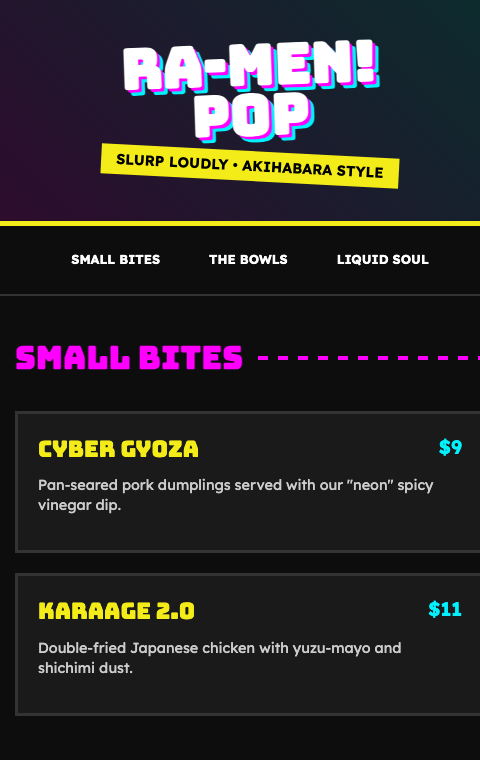
Japanese Ramen Pop
Neon Tokyo energy and bold display type for ramen bars and street kitchens.
-
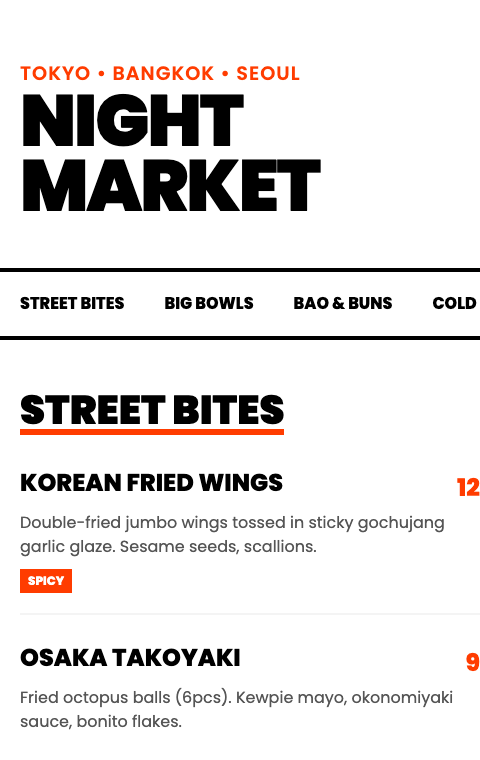
Night Market
High-contrast black and orange for modern street food and Asian fusion.
The QR code menu generator built for restaurants
Everything a restaurant menu needs, built for busy kitchens, not for designers. Set it up once and update it in seconds.
-
Mobile-first and responsive
Your menu reads perfectly on any phone. No pinching, no zooming, no sideways scrolling.
-
Update prices without reprinting
Edit the file and re-upload. The URL and QR code stay the same, so nothing on your tables changes.
-
Free QR code generator
Supadrop builds your QR code automatically. Download it as PNG, ready for table tents and windows.
-
Your own domain
Connect menu.yourrestaurant.com on any paid plan for a fully branded link.
-
Loads instantly
Static hosting keeps your menu fast even on slow mobile data, so hungry diners never wait.
-
Multiple locations
One account, a separate menu and QR code for each venue. Manage them all in one place.
Printed menu vs digital QR menu
The same menu, without the print bill or the reprint every time a price moves.
| Comparison point | Printed menu | Digital QR menu |
|---|---|---|
| Update cost | Reprint every time | Free, instant |
| Hygiene | Touched by every customer | Contactless |
| Setup time | Days (design + print) | Under 10 minutes |
| Price changes | Reprint required | Edit and re-upload |
| Multiple locations | Multiply the cost | Same URL, same QR |
Static site hosting pricing
Start with 15 free days, no card. Paid plans from $7 a month.
First 100 restaurants: 50% off. Unlock your code in the templates section.
Free to start
Every account starts with 15 days to try Supadrop, no credit card.
$0 for 15 days
- Included: 1 live site
- Included: 50 MB storage
- Included: Your own subdomain
- Included: Free SSL
- Included: QR code
Nothing is charged when it ends. If you don't pick a plan, your site goes offline and your files stay safe for 30 days.
supa starter
- Included: 2 sites
- Included: 500 MB storage
- Included: Your own subdomain
- Included: Custom domain
- Included: Free SSL
- Included: Unlimited traffic
- Included: QR codes
- Not included: API
supa pro
- Included: 10 sites
- Included: 5 GB storage
- Included: Your own subdomain
- Included: Custom domain
- Included: Free SSL
- Included: Unlimited traffic
- Included: QR codes
- Included: API
supa large
- Included: 30 sites
- Included: 20 GB storage
- Included: Your own subdomain
- Included: Custom domain
- Included: Free SSL
- Included: Unlimited traffic
- Included: QR codes
- Included: API
Restaurant QR menu questions, answered
Is the QR code menu really free?
Yes. Supadrop offers a free 15-day trial with no credit card: one live menu up to 50 MB, your own subdomain, SSL and a QR code. The QR code generator is included in the trial and in every paid plan.
What happens to my QR code when the trial ends?
Nothing breaks. Your menu and its QR code stay live. When the 15 days end you simply pick a plan from $5/mo to keep it online. We never charge a card you did not enter.
Do I need any coding skills?
No. ChatGPT writes the HTML for you, or you start from one of our 4 free templates. If you can use email, you can do this.
How do I make a QR code for my menu?
Supadrop works as a QR code generator for your restaurant menu: the code is created automatically when you publish your site. Download it as a PNG and print it for your tables, no separate tool needed.
Can I update my menu without reprinting the QR code?
Yes. Edit your file, re-upload it, and the URL stays the same. Every customer who scans your QR code sees the updated menu instantly.
Can I use my own domain?
Yes. With any paid plan you can connect a custom domain like menu.yourrestaurant.com, with the SSL certificate handled automatically.
Can I use this for multiple restaurant locations?
Absolutely. Create a separate menu file and QR code for each location and manage them all from one Supadrop account.
How does the 50% launch discount work?
The first 100 restaurants get 50% off. Enter your email in the templates section to receive the bundle and your code, then apply it at checkout.
Create your QR code menu today
Pick a template, drop it on Supadrop, and print your QR code. Your first menu can be live in under ten minutes.
Start free, no credit cardYour menu stays live after the trial. Keep it from $5/mo, no card on file.
First 100 restaurants get 50% off. Grab your code in the templates section.